
Subtotal Connect for Shopify

The Subtotal Connect Shopify app adds account-linking to your store so customers can connect their retailer accounts (e.g., Amazon, Walmart, Sephora) and share verified purchases with you. Install the app from the Shopify App Store, then add one or both of the components below to your store.

Components

The app includes two components. Use one or both depending on your theme and whether you use the new Shopify customer accounts experience.

Theme app block

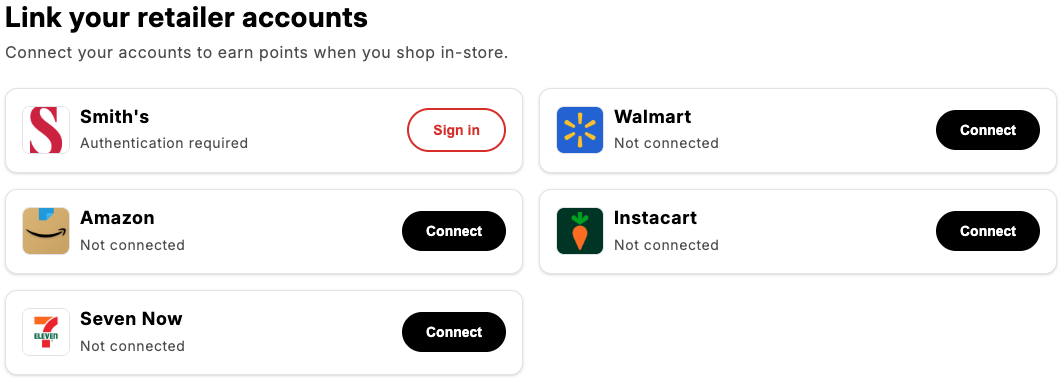
A block you add in the Shopify theme editor—typically on the Account page or another customer-facing page. It shows a list of supported retailers so customers can link, disconnect, or reauthenticate accounts. The theme app block is fully customizable: you can change copy and colors in the theme editor, and use custom CSS for advanced styling (see Customizing the theme app block below). shopify-block-default
Profile UI extension

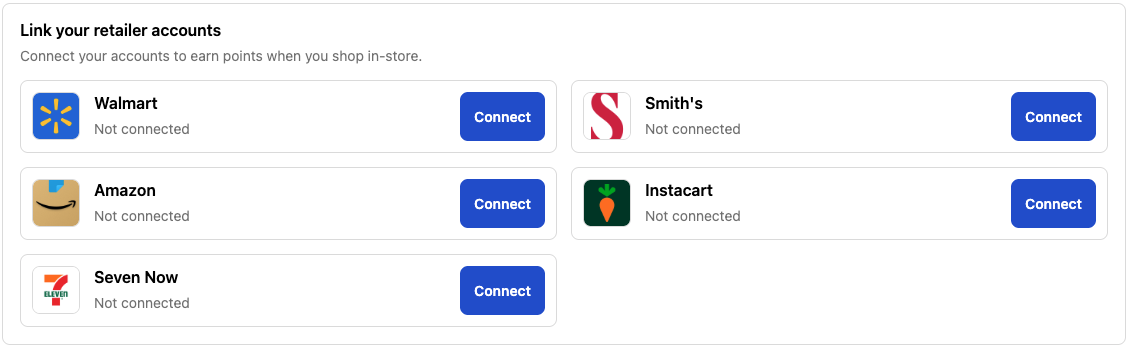
An extension that works with the newer Shopify customer accounts. When enabled, customers can manage their linked retailer accounts from their profile without needing the theme app block on a specific page. The profile extension uses Shopify’s default styling for the customer account area. shopify-profile-extension
Customizing the theme app block

The following sections apply only to the theme app block. They do not apply to the profile UI extension.

Quick Start

  1. In your Shopify admin, go to Online Store > Themes
  2. Click Customize on your active theme
  3. Navigate to the page where Subtotal Connect is placed (typically the Account page)
  4. Click on the Subtotal Connect block in the sidebar
  5. Adjust settings to match your brand
  6. Click Save to apply changes

Theme editor settings

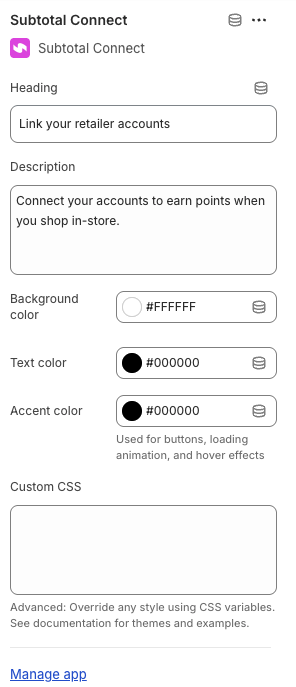
The following settings are available for the theme app block in the Shopify theme editor:
SettingDescriptionDefault
HeadingMain title displayed above the retailer list”Link your retailer accounts”
DescriptionSubtitle text explaining the feature”Connect your accounts to earn points when you shop in-store.”
Background colorApp block container background#ffffff
Text colorPrimary text color for headings and retailer names#000000
Accent colorUsed for buttons, loading animation, and hover effects#000000
Custom CSSAdvanced CSS overrides using CSS variablesEmpty
shopify-app-block-settings

CSS Variables Reference

For advanced customization, use the Custom CSS field in the theme app block settings to override any style. All styles are controlled through CSS custom properties that you can override.

Color Variables

--subtotal-connect-bg                    /* App block background */
--subtotal-connect-text-primary          /* Primary text color */
--subtotal-connect-text-secondary        /* Secondary/muted text color */
--subtotal-connect-border-color          /* Container border color */
--subtotal-connect-accent-color          /* Accent/highlight color */
--subtotal-connect-card-bg               /* Card background */
--subtotal-connect-card-border-color     /* Card border color */

Button Variables

--subtotal-connect-btn-primary-bg        /* "Connect" button background */
--subtotal-connect-btn-primary-text      /* "Connect" button text */
--subtotal-connect-btn-secondary-bg      /* "Sign in"/"Disconnect" button background */
--subtotal-connect-btn-secondary-text    /* "Sign in"/"Disconnect" button text */
--subtotal-connect-btn-secondary-border  /* "Sign in"/"Disconnect" button border */

Typography Variables

--subtotal-connect-heading-size          /* Heading font size (default: 28px) */
--subtotal-connect-description-size      /* Description font size (default: 16px) */
--subtotal-connect-card-name-size        /* Retailer name font size (default: 18px) */
--subtotal-connect-card-status-size      /* Status text font size (default: 14px) */
--subtotal-connect-btn-font-size         /* Button font size (default: 14px) */

Spacing Variables

--subtotal-connect-spacing               /* Container padding (default: 24px) */
--subtotal-connect-card-gap              /* Gap between cards (default: 16px) */
--subtotal-connect-card-padding          /* Padding inside cards (default: 16px) */

Border Radius Variables

--subtotal-connect-container-radius      /* Container border radius (default: 12px) */
--subtotal-connect-card-radius           /* Card border radius (default: 12px) */
--subtotal-connect-btn-radius            /* Button border radius (default: 9999px) */
--subtotal-connect-logo-radius           /* Logo border radius (default: 8px) */

Effect Variables

--subtotal-connect-card-shadow           /* Card shadow (default: subtle shadow) */

Premade CSS Themes

Copy and paste these themes into the Custom CSS field (theme app block settings) for instant styling. Each theme is designed to work as a complete style override.

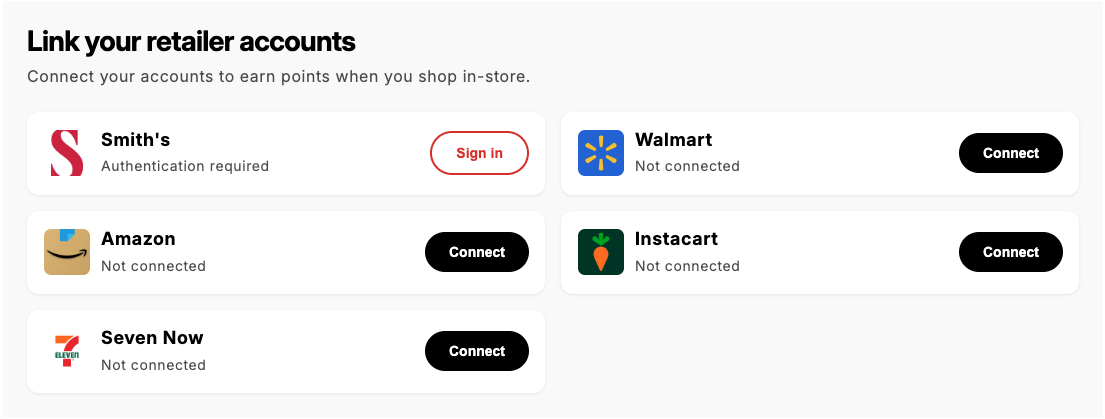
Clean Minimal

A clean, borderless design with subtle shadows and refined spacing. shopify-clean-minimal
.subtotal-connect {
  --subtotal-connect-bg: #fafafa;
  --subtotal-connect-card-bg: #ffffff;
  --subtotal-connect-card-shadow: 0 1px 3px rgba(0,0,0,0.08);
  --subtotal-connect-card-border-color: transparent;
}

.retailer-card {
  border: none !important;
}

.subtotal-connect__heading {
  letter-spacing: -0.025em;
}

Modern Gradient

A contemporary theme with a gradient header accent and modern styling. shopify-modern-gradient
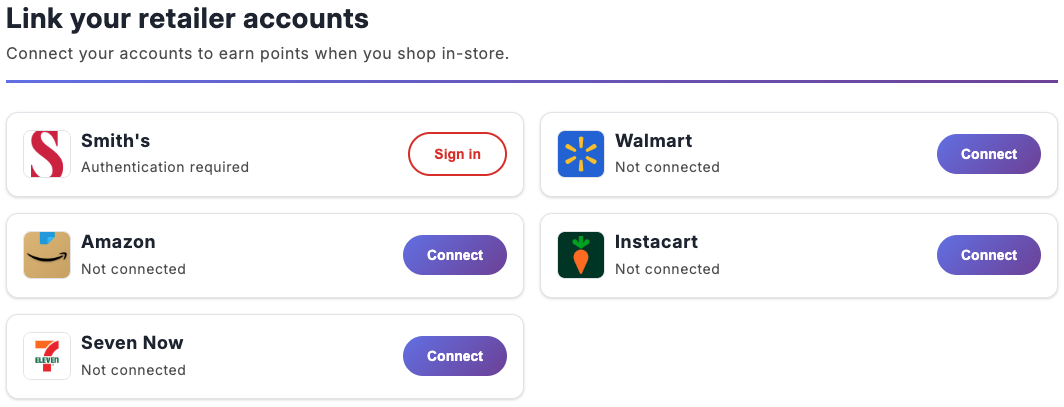
.subtotal-connect {
  --subtotal-connect-text-primary: #1f2937;
  --subtotal-connect-card-border-color: #e5e7eb;
}

.subtotal-connect__header {
  padding-bottom: 1.5rem;
  border-bottom: 3px solid;
  border-image: linear-gradient(90deg, #667eea, #764ba2) 1;
  margin-bottom: 0.5rem;
}

.retailer-card__button--primary {
  background: linear-gradient(135deg, #667eea 0%, #764ba2 100%) !important;
}

.retailer-card__button--primary:hover {
  filter: brightness(1.1) !important;
  box-shadow: 0 4px 15px rgba(102, 126, 234, 0.4);
}

Dark Mode

A striking dark theme perfect for stores with dark aesthetics. shopify-dark-mode
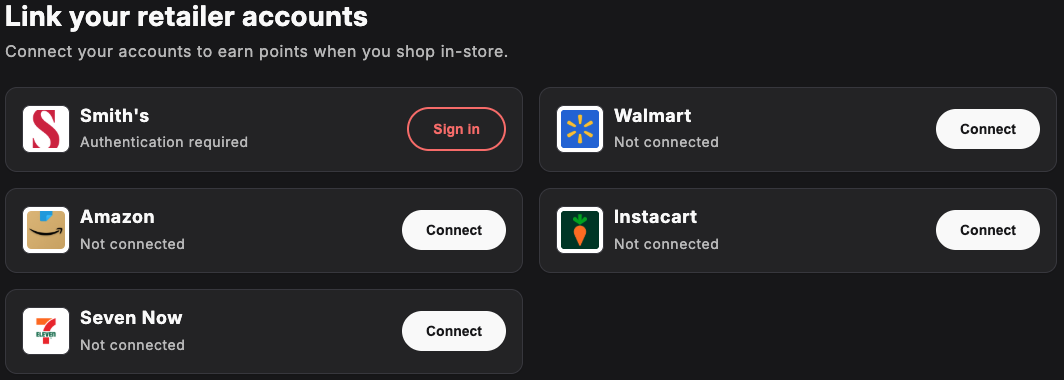
.subtotal-connect {
  --subtotal-connect-bg: #18181b;
  --subtotal-connect-text-primary: #fafafa;
  --subtotal-connect-text-secondary: rgba(250, 250, 250, 0.7);
  --subtotal-connect-card-bg: #27272a;
  --subtotal-connect-card-border-color: #3f3f46;
  --subtotal-connect-border-color: #3f3f46;
  --subtotal-connect-accent-color: #a78bfa;
  --subtotal-connect-btn-primary-bg: #fafafa;
  --subtotal-connect-btn-primary-text: #18181b;
  --subtotal-connect-btn-secondary-bg: transparent;
  --subtotal-connect-btn-secondary-text: #f87171;
  --subtotal-connect-btn-secondary-border: #f87171;
}

.retailer-card__logo {
  background-color: #ffffff;
  padding: 4px;
}

Soft & Rounded (Warm)

A friendly, approachable design with soft colors and generous rounding. shopify-soft-and-rounded
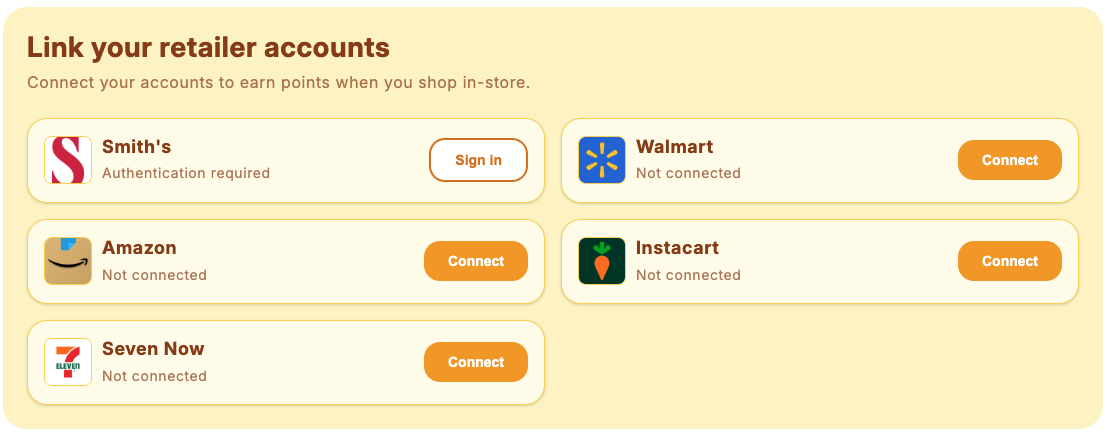
.subtotal-connect {
  --subtotal-connect-bg: #fef3c7;
  --subtotal-connect-text-primary: #92400e;
  --subtotal-connect-text-secondary: rgba(146, 64, 14, 0.7);
  --subtotal-connect-card-bg: #fffbeb;
  --subtotal-connect-card-border-color: #fcd34d;
  --subtotal-connect-accent-color: #f59e0b;
  --subtotal-connect-btn-primary-bg: #f59e0b;
  --subtotal-connect-btn-primary-text: #ffffff;
  --subtotal-connect-btn-secondary-text: #d97706;
  --subtotal-connect-btn-secondary-border: #d97706;
  --subtotal-connect-card-radius: 20px;
  --subtotal-connect-btn-radius: 16px;
  border-radius: 24px;
}

Professional Blue

A corporate, trustworthy design with blue accents. shopify-professional-blue
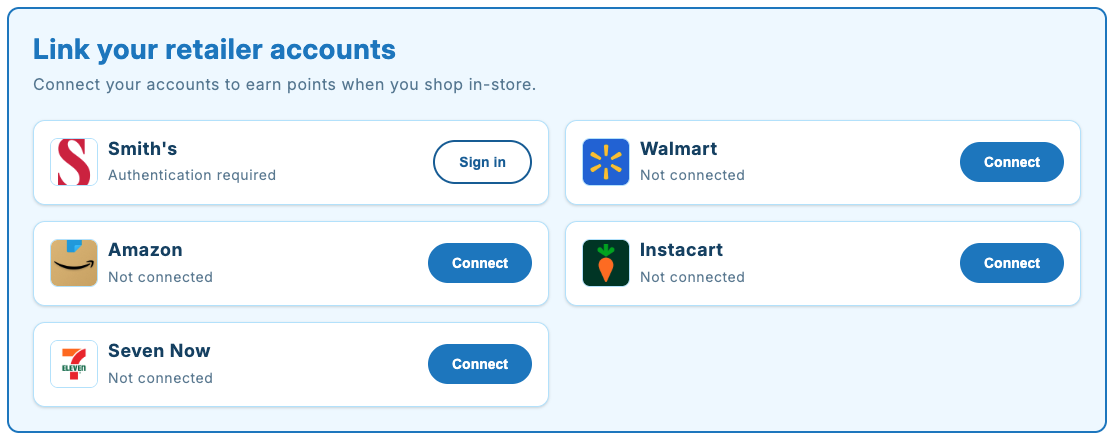
.subtotal-connect {
  --subtotal-connect-bg: #f0f9ff;
  --subtotal-connect-text-primary: #0c4a6e;
  --subtotal-connect-text-secondary: rgba(12, 74, 110, 0.7);
  --subtotal-connect-card-bg: #ffffff;
  --subtotal-connect-card-border-color: #bae6fd;
  --subtotal-connect-accent-color: #0284c7;
  --subtotal-connect-btn-primary-bg: #0284c7;
  --subtotal-connect-btn-primary-text: #ffffff;
  --subtotal-connect-btn-secondary-text: #0369a1;
  --subtotal-connect-btn-secondary-border: #0369a1;
  border: 2px solid #0284c7;
  border-radius: 12px;
}

.subtotal-connect__heading {
  color: #0284c7;
}

Elegant Card

A sophisticated design with a prominent left border accent. shopify-elegant-card
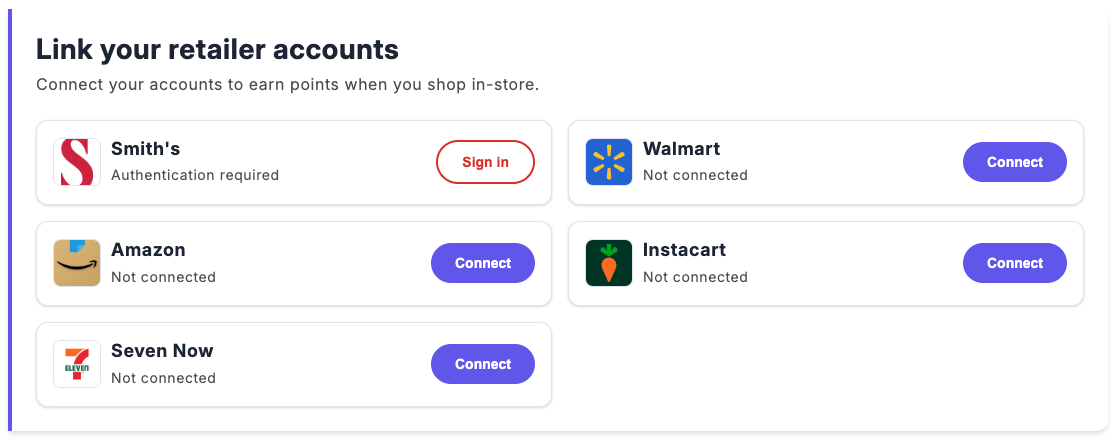
.subtotal-connect {
  --subtotal-connect-text-primary: #1e293b;
  --subtotal-connect-accent-color: #6366f1;
  --subtotal-connect-btn-primary-bg: #6366f1;
  --subtotal-connect-card-border-color: #e2e8f0;
  border-left: 4px solid #6366f1;
  border-radius: 0 12px 12px 0;
  box-shadow: 0 4px 6px -1px rgba(0,0,0,0.1), 0 2px 4px -1px rgba(0,0,0,0.06);
}

.retailer-card:hover {
  transform: translateX(4px) !important;
}

Playful Pop

A fun, eye-catching design with bold shadows and vibrant colors. shopify-playful-pop
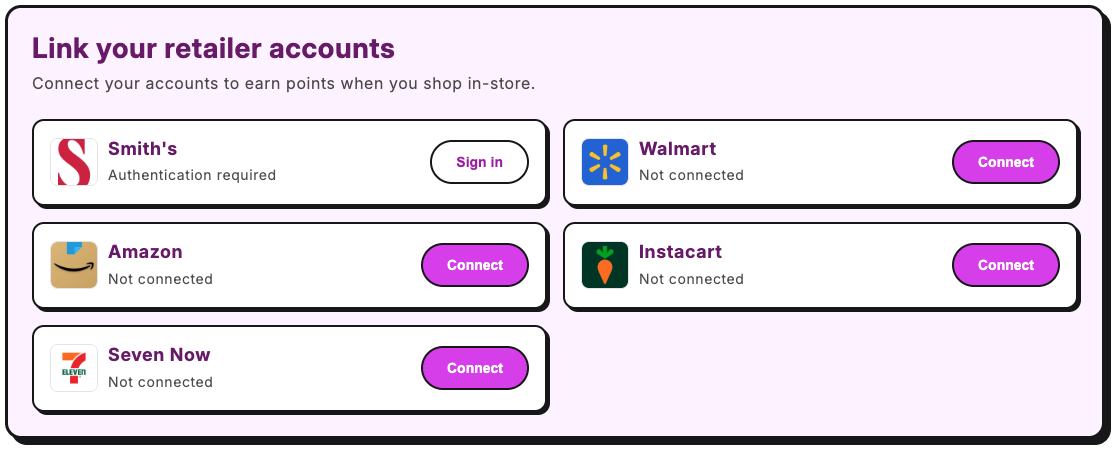
.subtotal-connect {
  --subtotal-connect-bg: #fdf4ff;
  --subtotal-connect-text-primary: #701a75;
  --subtotal-connect-accent-color: #d946ef;
  --subtotal-connect-card-bg: #ffffff;
  --subtotal-connect-btn-primary-bg: #d946ef;
  --subtotal-connect-btn-secondary-text: #a21caf;
  --subtotal-connect-btn-secondary-border: #a21caf;
  border: 3px solid #18181b;
  border-radius: 16px;
  box-shadow: 6px 6px 0 #18181b;
}

.retailer-card {
  border: 2px solid #18181b !important;
  box-shadow: 3px 3px 0 #18181b !important;
  transition: transform 0.15s ease, box-shadow 0.15s ease;
}

.retailer-card:hover {
  transform: translate(-2px, -2px) !important;
  box-shadow: 5px 5px 0 #18181b !important;
}

.retailer-card__button {
  border: 2px solid #18181b !important;
}

Nature Green

An earthy, eco-friendly design with natural green tones. shopify-nature-green
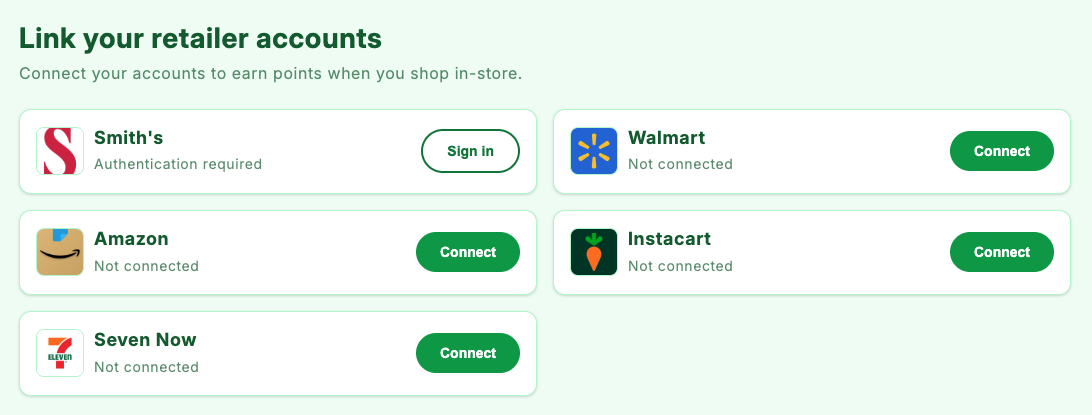
.subtotal-connect {
  --subtotal-connect-bg: #f0fdf4;
  --subtotal-connect-text-primary: #166534;
  --subtotal-connect-text-secondary: rgba(22, 101, 52, 0.7);
  --subtotal-connect-card-bg: #ffffff;
  --subtotal-connect-card-border-color: #bbf7d0;
  --subtotal-connect-accent-color: #22c55e;
  --subtotal-connect-btn-primary-bg: #16a34a;
  --subtotal-connect-btn-primary-text: #ffffff;
  --subtotal-connect-btn-secondary-text: #15803d;
  --subtotal-connect-btn-secondary-border: #15803d;
}

Advanced Customization Examples

Custom Fonts

Import and apply custom fonts from Google Fonts:
@import url('https://fonts.googleapis.com/css2?family=Inter:wght@400;500;600;700&display=swap');

.subtotal-connect {
  font-family: 'Inter', sans-serif;
}

.subtotal-connect__heading {
  font-family: 'Inter', sans-serif;
}

Custom Entrance Animation

Replace the default fade-in with a custom animation:
.subtotal-connect {
  animation: custom-slide-up 0.6s ease-out !important;
}

@keyframes custom-slide-up {
  0% {
    opacity: 0;
    transform: translateY(30px);
  }
  100% {
    opacity: 1;
    transform: translateY(0);
  }
}

Staggered Card Animation

Add staggered animations to cards as they appear:
.retailer-card {
  animation: card-fade-in 0.4s ease-out;
  animation-fill-mode: both;
}

.retailer-card:nth-child(1) { animation-delay: 0.1s; }
.retailer-card:nth-child(2) { animation-delay: 0.2s; }
.retailer-card:nth-child(3) { animation-delay: 0.3s; }
.retailer-card:nth-child(4) { animation-delay: 0.4s; }

@keyframes card-fade-in {
  0% {
    opacity: 0;
    transform: translateY(20px);
  }
  100% {
    opacity: 1;
    transform: translateY(0);
  }
}

Glassmorphism Effect

Create a modern frosted glass appearance:
.subtotal-connect {
  --subtotal-connect-bg: rgba(255, 255, 255, 0.7);
  --subtotal-connect-card-bg: rgba(255, 255, 255, 0.5);
  backdrop-filter: blur(10px);
  -webkit-backdrop-filter: blur(10px);
  border: 1px solid rgba(255, 255, 255, 0.3);
}

.retailer-card {
  backdrop-filter: blur(5px);
  -webkit-backdrop-filter: blur(5px);
  border: 1px solid rgba(255, 255, 255, 0.4) !important;
}

Center-Aligned Header

Change the header alignment to centered:
.subtotal-connect__header {
  text-align: center;
  align-items: center;
}

Adjust Typography Sizes

Make the app block more compact or larger:
/* Compact version */
.subtotal-connect {
  --subtotal-connect-heading-size: 22px;
  --subtotal-connect-description-size: 14px;
  --subtotal-connect-card-name-size: 16px;
  --subtotal-connect-card-status-size: 12px;
  --subtotal-connect-spacing: 16px;
  --subtotal-connect-card-padding: 12px;
}

/* Larger version */
.subtotal-connect {
  --subtotal-connect-heading-size: 36px;
  --subtotal-connect-description-size: 18px;
  --subtotal-connect-card-name-size: 22px;
  --subtotal-connect-spacing: 32px;
}

Remove Card Shadows and Borders

For a flatter, more minimal look:
.subtotal-connect {
  --subtotal-connect-card-shadow: none;
}

.retailer-card {
  border: none !important;
}

Add Container Border

Wrap the app block in a border:
.subtotal-connect {
  border: 1px solid var(--subtotal-connect-border-color);
  border-radius: var(--subtotal-connect-container-radius);
}

Custom Mobile Breakpoint Styles

Fine-tune the app block for mobile devices:
@media (max-width: 480px) {
  .subtotal-connect {
    --subtotal-connect-heading-size: 22px;
    --subtotal-connect-description-size: 14px;
    --subtotal-connect-spacing: 16px;
  }
  
  .retailer-card__button {
    padding: 10px 16px !important;
    font-size: 13px !important;
  }
}

Key Elements Reference

Use these class names to target specific elements in your Custom CSS for the theme app block:
ElementClassDescription
Container.subtotal-connectMain app block wrapper
Inner Container.subtotal-connect__containerFlex container for layout
Header.subtotal-connect__headerContains heading and description
Heading.subtotal-connect__headingMain title (h1)
Description.subtotal-connect__descriptionSubtitle paragraph
Retailers Grid.subtotal-connect__retailers-listGrid container for cards
Loading Animation.subtotal-connect__loadingLoading dots container
Loading Dot.subtotal-connect__dotIndividual loading dot
Card.retailer-cardIndividual retailer card
Card Info.retailer-card__infoLogo and text container
Logo Container.retailer-card__logo-containerLogo wrapper
Logo.retailer-card__logoRetailer logo image
Name/Status.retailer-card__name-statusText container
Retailer Name.retailer-card__nameRetailer name (h3)
Status.retailer-card__statusConnection status text
Button.retailer-card__buttonAction button
Primary Button.retailer-card__button--primaryConnect button
Secondary Button.retailer-card__button--secondarySign in/Disconnect button

Troubleshooting (theme app block)

CSS Changes Not Appearing

  1. Make sure you clicked Save after adding custom CSS
  2. Clear your browser cache and hard refresh (Cmd/Ctrl + Shift + R)
  3. Check for CSS syntax errors (missing semicolons, brackets)
  4. Use !important if your styles are being overridden by theme CSS

App Block Not Displaying

  1. Ensure you’re logged in as a customer when viewing the account page
  2. Check that the Subtotal app is properly configured
  3. Verify the block is added to the correct page template

Styles Conflicting with Theme

If your Shopify theme’s CSS conflicts with the app block:
/* Increase specificity */
#subtotal-connect-app-block.subtotal-connect {
  /* Your styles here */
}

/* Or use !important (use sparingly) */
.subtotal-connect__heading {
  color: #000000 !important;
}

Custom CSS Field Too Small

The Custom CSS textarea in Shopify’s theme editor is small. For complex themes:
  1. Write your CSS in a separate code editor
  2. Copy and paste into the Custom CSS field
  3. Keep a backup of your custom CSS locally

Need Help?

If you need assistance with custom designs or have questions about the theme app block:
  • Contact our support team at support@subtotal.com
  • Include screenshots of your current setup and desired outcome
  • Provide your store URL for faster troubleshooting