> ## Documentation Index
> Fetch the complete documentation index at: https://docs.subtotal.com/llms.txt
> Use this file to discover all available pages before exploring further.
# Partner webhooks
> Configure app events and verify signed webhook deliveries.
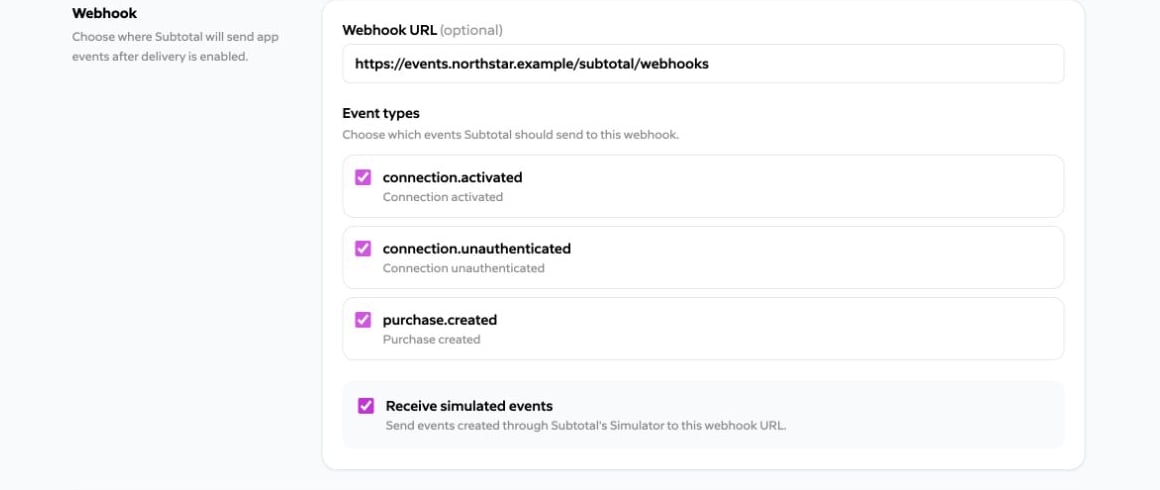
A partner app sends events to a single webhook endpoint. Configure the endpoint and event types in **Created Apps**.
## Configure delivery
Enter a public HTTPS **Webhook URL**, then select any of the currently supported event types:
* `connection.activated`
* `connection.unauthenticated`
* `purchase.created`
See [Webhook event types](/docs/webhooks/events) for the complete payload schema for each event and [Identify the installing dashboard team](#identify-the-installing-dashboard-team) for how to determine which brand the event belongs to.
Webhook delivery begins after a brand successfully installs the app. Reauthorizing the same dashboard team updates the existing installation rather than creating a duplicate.
The app's fixed OAuth grant controls which events it can receive: `connections:read` permits the connection events, and `purchases:brand_products` is required for `purchase.created`.
 ## Identify the installing dashboard team
Partner deliveries add `subtotal_client_id` at the top level. Use it to route the event to the correct brand in your system.
```jsonc theme={null}
{
"type": "connection.activated",
"id": "",
"subtotal_client_id": "",
"payload": {
// Event-specific fields omitted
}
}
```
The event `id` is stable across delivery replays. Make handlers idempotent by deduplicating on that ID within the installing dashboard team.
## Verify every request
Use the app's signing secret to verify every delivery. See [Verifying webhook signatures](/docs/webhooks/verifying-signatures) for the shared signing protocol and implementation guidance.
Subtotal sends:
| Header | Value |
| :--------------------- | :--------------------------------------- |
| `X-Subtotal-Timestamp` | Unix timestamp in seconds |
| `X-Subtotal-Signature` | Lowercase hexadecimal HMAC-SHA256 digest |
Compute the HMAC over the timestamp, one period, and the **exact raw request body**:
```text theme={null}
signed_payload = X-Subtotal-Timestamp + "." + raw_body
```
```js theme={null}
import { createHmac, timingSafeEqual } from "node:crypto";
export function verifySubtotalWebhook({ rawBody, timestamp, signature, secrets }) {
if (!/^\d+$/.test(timestamp) || !/^[0-9a-f]{64}$/.test(signature)) {
return false;
}
const received = Buffer.from(signature, "hex");
const signedPayload = `${timestamp}.${rawBody}`;
return secrets.some((secret) => {
const expected = createHmac("sha256", secret)
.update(signedPayload, "utf8")
.digest();
return expected.length === received.length &&
timingSafeEqual(expected, received);
});
}
```
Also reject timestamps outside your replay-tolerance window and acknowledge valid requests with a `2xx` response quickly. Parse JSON only after signature verification.
### Rotate the signing secret
Use **Rotate signing secret** in **Created Apps**. Deploy the new value and keep the returned previous value as a verifier for no more than 24 hours. Pass both values in `secrets` during the overlap; afterward, remove the previous value.
## Simulated events
Enable **Receive simulated events** to deliver events created through Subtotal's [Event Simulator](/docs/event-simulator) to installed copies of this app. Leave it disabled if your endpoint should receive only non-simulated activity.
When enabled, simulated events matching the app's selected event types are sent to the same webhook endpoint as other events.
**Receive simulated events** must be disabled for approved apps.
## Disconnect behavior
When a brand disconnects the app, Subtotal immediately stops webhook delivery for that brand. Other brands' installations are unaffected. A later reinstall resumes delivery using the app's current webhook configuration.
## Identify the installing dashboard team
Partner deliveries add `subtotal_client_id` at the top level. Use it to route the event to the correct brand in your system.
```jsonc theme={null}
{
"type": "connection.activated",
"id": "",
"subtotal_client_id": "",
"payload": {
// Event-specific fields omitted
}
}
```
The event `id` is stable across delivery replays. Make handlers idempotent by deduplicating on that ID within the installing dashboard team.
## Verify every request
Use the app's signing secret to verify every delivery. See [Verifying webhook signatures](/docs/webhooks/verifying-signatures) for the shared signing protocol and implementation guidance.
Subtotal sends:
| Header | Value |
| :--------------------- | :--------------------------------------- |
| `X-Subtotal-Timestamp` | Unix timestamp in seconds |
| `X-Subtotal-Signature` | Lowercase hexadecimal HMAC-SHA256 digest |
Compute the HMAC over the timestamp, one period, and the **exact raw request body**:
```text theme={null}
signed_payload = X-Subtotal-Timestamp + "." + raw_body
```
```js theme={null}
import { createHmac, timingSafeEqual } from "node:crypto";
export function verifySubtotalWebhook({ rawBody, timestamp, signature, secrets }) {
if (!/^\d+$/.test(timestamp) || !/^[0-9a-f]{64}$/.test(signature)) {
return false;
}
const received = Buffer.from(signature, "hex");
const signedPayload = `${timestamp}.${rawBody}`;
return secrets.some((secret) => {
const expected = createHmac("sha256", secret)
.update(signedPayload, "utf8")
.digest();
return expected.length === received.length &&
timingSafeEqual(expected, received);
});
}
```
Also reject timestamps outside your replay-tolerance window and acknowledge valid requests with a `2xx` response quickly. Parse JSON only after signature verification.
### Rotate the signing secret
Use **Rotate signing secret** in **Created Apps**. Deploy the new value and keep the returned previous value as a verifier for no more than 24 hours. Pass both values in `secrets` during the overlap; afterward, remove the previous value.
## Simulated events
Enable **Receive simulated events** to deliver events created through Subtotal's [Event Simulator](/docs/event-simulator) to installed copies of this app. Leave it disabled if your endpoint should receive only non-simulated activity.
When enabled, simulated events matching the app's selected event types are sent to the same webhook endpoint as other events.
**Receive simulated events** must be disabled for approved apps.
## Disconnect behavior
When a brand disconnects the app, Subtotal immediately stops webhook delivery for that brand. Other brands' installations are unaffected. A later reinstall resumes delivery using the app's current webhook configuration.