> ## Documentation Index
> Fetch the complete documentation index at: https://docs.subtotal.com/llms.txt
> Use this file to discover all available pages before exploring further.
# Connect Meta to Subtotal
> Send purchases from retailers and marketplaces, along with account-linking events, to your Meta dataset.
[Subtotal Signal](/docs/subtotal-signal/introduction) sends eligible purchases from retailers and marketplaces, along with account-linking events, to Meta through the Conversions API. Use these signals to understand the purchases Meta attributes to your ads.
This supports measurement of purchases beyond your DTC website—what we refer to as offline conversions in Signal. Meta can match received events to people and evaluate attribution to ad views or clicks. These purchases can take place in stores, on retailer websites, or through marketplaces. See [events and data](/docs/integrations/meta/events) for how purchase channels and action sources are represented.
**Connect → choose events → verify delivery → measure results**
## Before you start
* Access to Subtotal and the Meta business portfolio that owns your dataset.
* Permission to grant Subtotal access to that dataset.
* Access to the ad account you want to use for reporting.
* Your team's approval for ad-platform sharing. See [consumer choices and opt-outs](/docs/subtotal-signal/opt-outs).
* A working process for [communicating consumer opt-outs to Subtotal](/docs/subtotal-signal/opt-outs#connect-your-opt-out-process-to-signal), including applicable opt-outs you already hold, before enabling event delivery.
### Existing or new dataset?
| Choose | When |
| ---------------- | ---------------------------------------------------------------- |
| Existing dataset | You want retail signals alongside your current advertising data. |
| Separate dataset | You want to isolate setup and validation from existing data. |
Subtotal sends to datasets you grant access to; it does not create one for you.
Avoid sending the same purchase through Subtotal and another provider. Overlapping feeds can double-count sales.
## Connect and configure
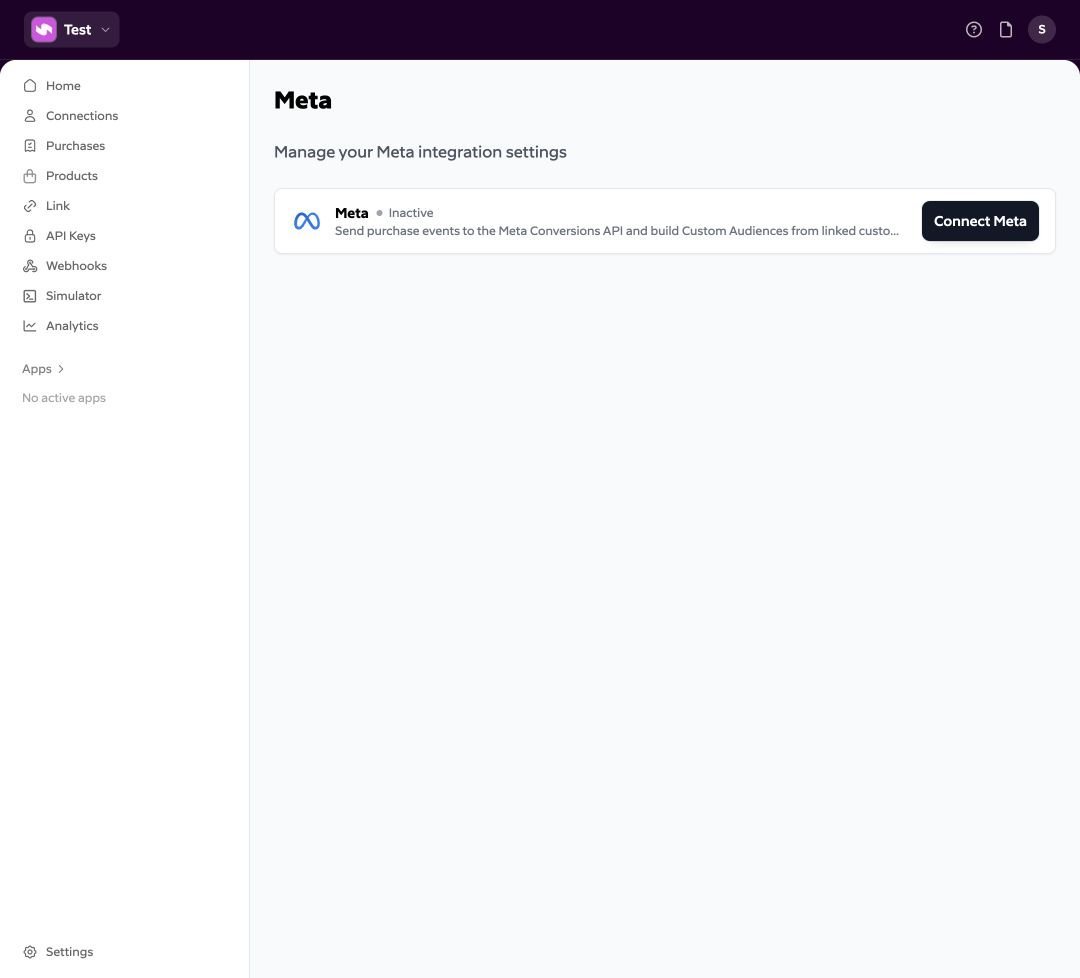
Open [Meta in the Subtotal Dashboard](https://dashboard.subtotal.com/integrations/meta), then select **Connect**. Complete Meta authorization and grant the intended business assets.
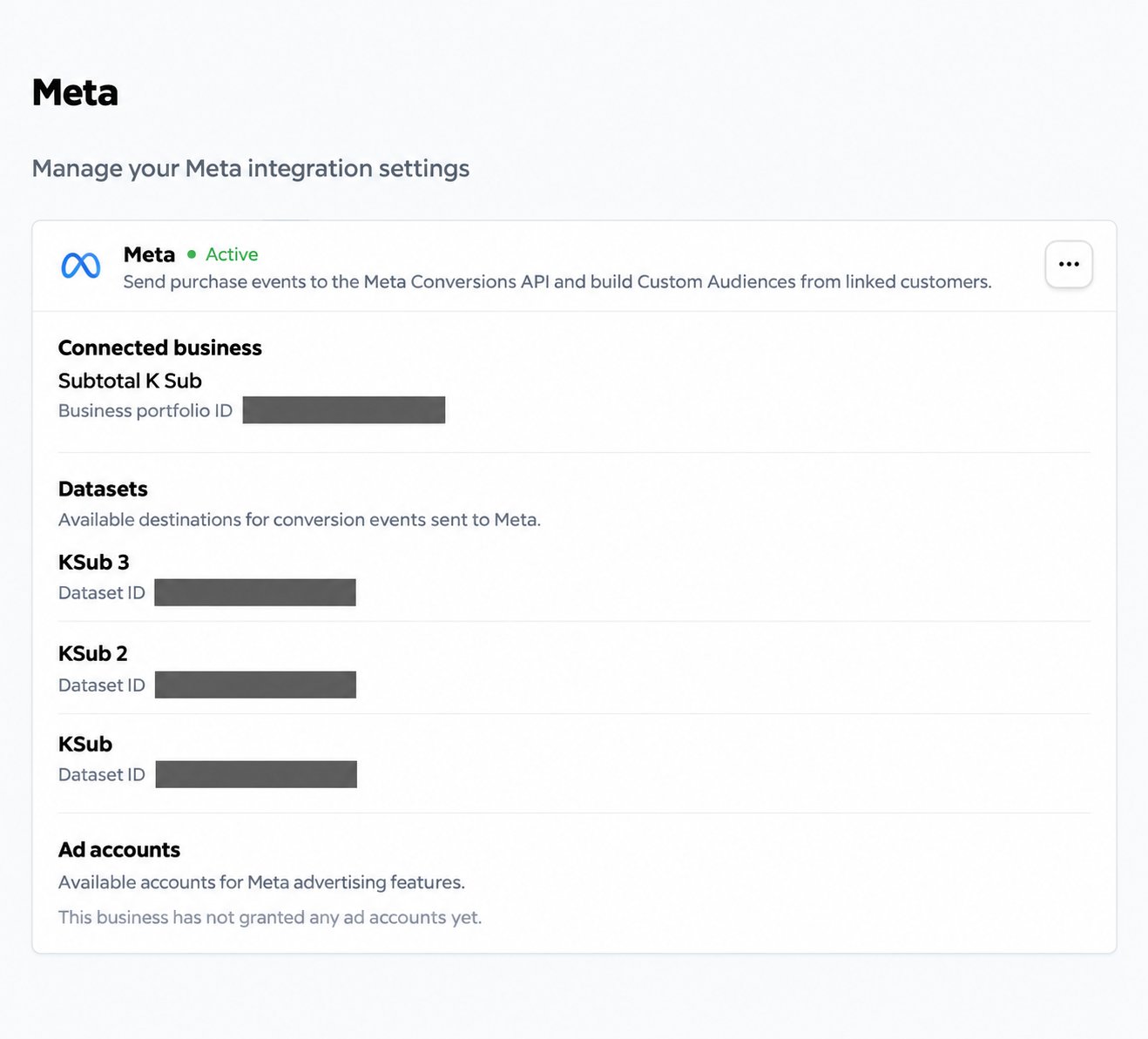
Back in Subtotal, check **Connected business** and **Datasets**. Confirm the dataset ID, not just its name.
If it is missing, check permissions in Meta and use **Update** on the integration to authorize again.
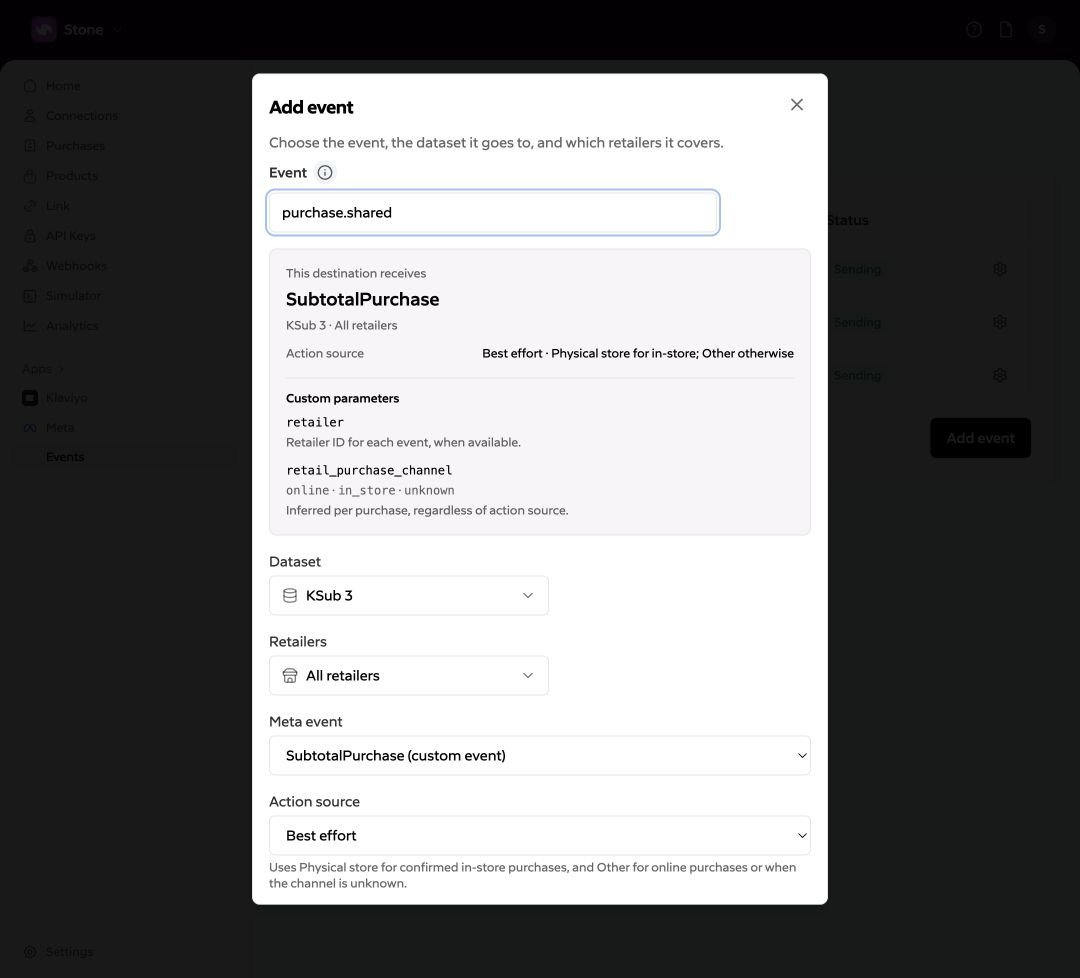
 Open [Meta → Events](https://dashboard.subtotal.com/integrations/meta/events) and select **Add event**.
| Setting | Choose |
| ------------- | ----------------------------------------------------------------------------------------------------------------------------------------------------------------------------------------------------- |
| Event | `purchase.shared` or `account.linked` |
| Dataset | The destination for this event |
| Retailers | All retailers or a selected set |
| Meta event | For purchases: `SubtotalPurchase` or `Purchase` |
| Action source | How the event is classified; see [purchase settings](/docs/integrations/meta/events#purchase-action-source) or [account-linked settings](/docs/integrations/meta/events#account-linked-action-source) |
Select **Add** to save. Repeat for another event or dataset. Each event type supports one configuration per dataset—not both purchase names in the same dataset.
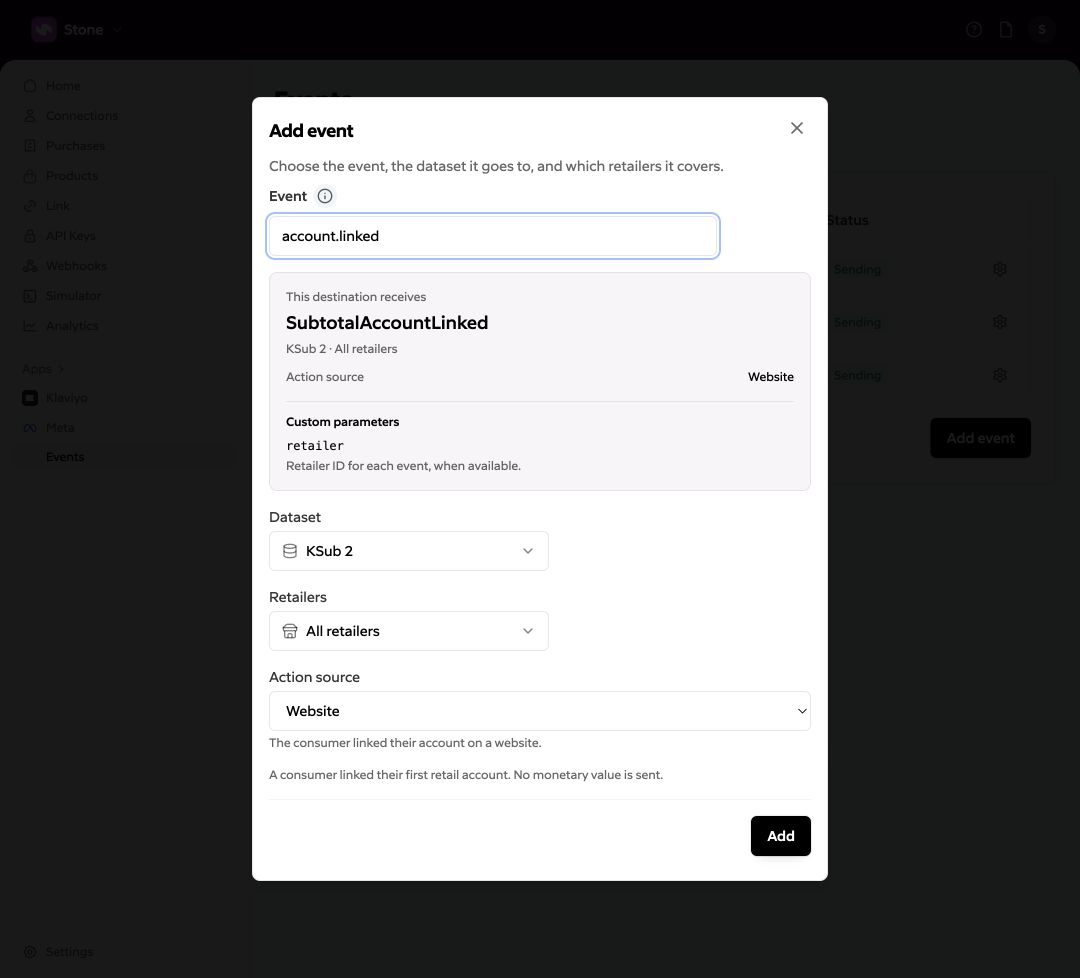
Open [Meta → Events](https://dashboard.subtotal.com/integrations/meta/events) and select **Add event**.
| Setting | Choose |
| ------------- | ----------------------------------------------------------------------------------------------------------------------------------------------------------------------------------------------------- |
| Event | `purchase.shared` or `account.linked` |
| Dataset | The destination for this event |
| Retailers | All retailers or a selected set |
| Meta event | For purchases: `SubtotalPurchase` or `Purchase` |
| Action source | How the event is classified; see [purchase settings](/docs/integrations/meta/events#purchase-action-source) or [account-linked settings](/docs/integrations/meta/events#account-linked-action-source) |
Select **Add** to save. Repeat for another event or dataset. Each event type supports one configuration per dataset—not both purchase names in the same dataset.
 Complete a new, eligible account link for a selected retailer. For purchase verification, wait for an eligible recent purchase to be collected.
Open the matching dataset in [Meta Events Manager](https://business.facebook.com/events_manager2/list/) and inspect the configured event. Check its name, source, time, and available parameters. Allow for collection and processing delays.
Complete a new, eligible account link for a selected retailer. For purchase verification, wait for an eligible recent purchase to be collected.
Open the matching dataset in [Meta Events Manager](https://business.facebook.com/events_manager2/list/) and inspect the configured event. Check its name, source, time, and available parameters. Allow for collection and processing delays.
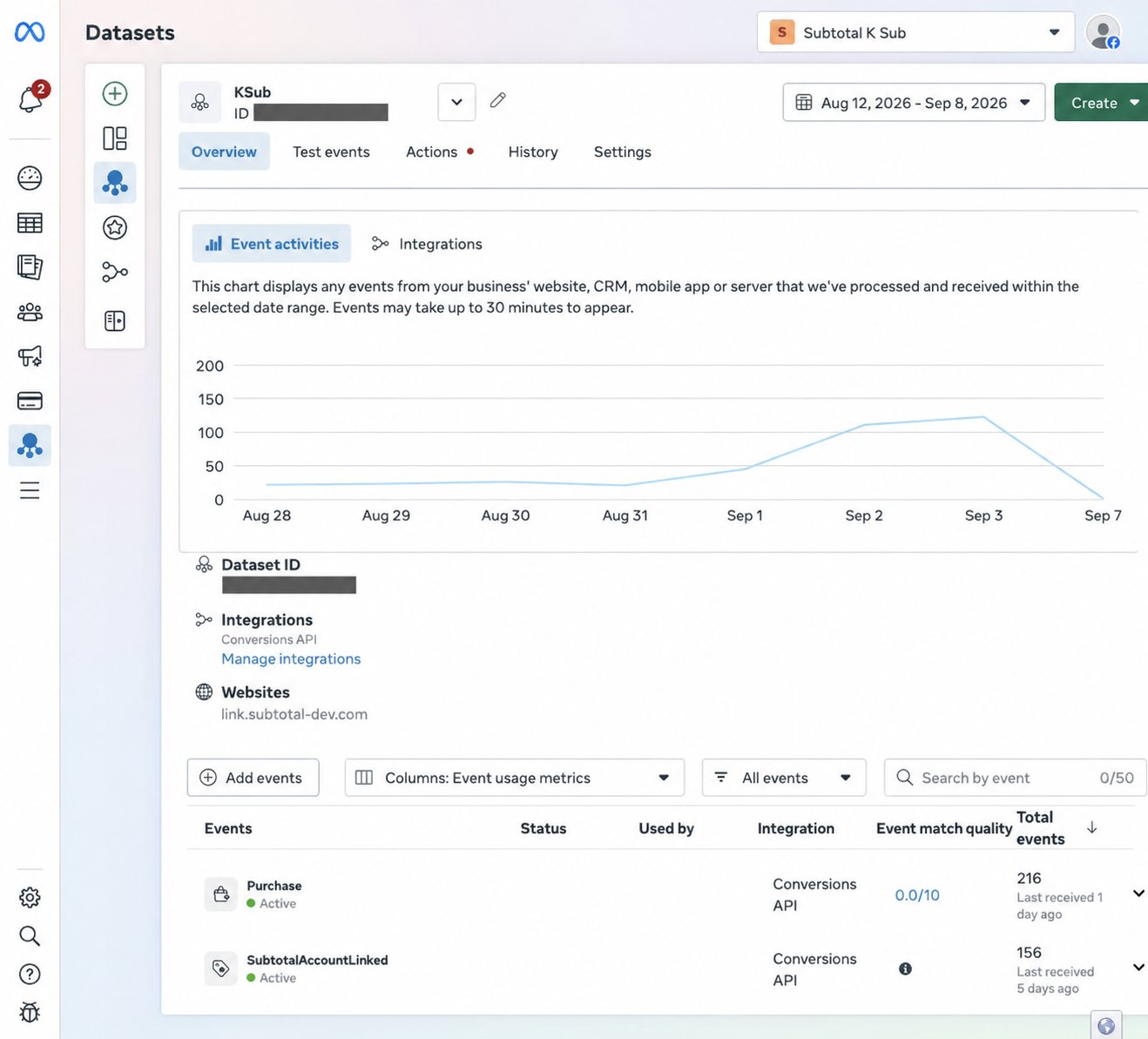 **Sending** in Subtotal means the event destination is configured. It is not a delivery receipt. An event appearing in Events Manager also does not prove ad attribution.
## If events are missing
| Check | What to do |
| -------------------------- | -------------------------------------------------------------------------------------------------- |
| Wrong dataset or retailer | Compare dataset IDs and retailer selections. |
| Reconnect banner | Reauthorize Meta; Subtotal keeps your event settings. |
| Existing account re-linked | Account-linked events fire on first activation, not each reauthorization. |
| Old purchase history | Subtotal skips events older than seven days. Enabling delivery does not backfill history. |
| Missing email or opt-out | Check identity and [ad-sharing eligibility](/docs/subtotal-signal/opt-outs). |
| No matching brand items | Purchase events contain only items matching your brands. |
| Still missing | Contact Subtotal with the connection/purchase ID, dataset ID, and time. Never share access tokens. |
Next: [Understand the events](/docs/integrations/meta/events).
**Sending** in Subtotal means the event destination is configured. It is not a delivery receipt. An event appearing in Events Manager also does not prove ad attribution.
## If events are missing
| Check | What to do |
| -------------------------- | -------------------------------------------------------------------------------------------------- |
| Wrong dataset or retailer | Compare dataset IDs and retailer selections. |
| Reconnect banner | Reauthorize Meta; Subtotal keeps your event settings. |
| Existing account re-linked | Account-linked events fire on first activation, not each reauthorization. |
| Old purchase history | Subtotal skips events older than seven days. Enabling delivery does not backfill history. |
| Missing email or opt-out | Check identity and [ad-sharing eligibility](/docs/subtotal-signal/opt-outs). |
| No matching brand items | Purchase events contain only items matching your brands. |
| Still missing | Contact Subtotal with the connection/purchase ID, dataset ID, and time. Never share access tokens. |
Next: [Understand the events](/docs/integrations/meta/events).